Journey Mapping, Service Blueprinting, And Card Sorting For Better Enterprise UX
Enterprise digital transformation rarely fails because of technology alone. More often, it stalls because teams never map the full experience — what users are trying to do, what the organisation must do behind the scenes, and how information should be structured to support both.
When enterprise systems see low adoption after launch, the problem is often not missing features but a poor understanding of the full experience. Journey mapping, service blueprinting, and card sorting help teams visualise user journeys, operational dependencies, and information structure — so they can design services that work end to end.
At Tarento, these are not abstract design exercises. They are practical tools we use to help enterprise teams see what they are building before they build it — and align business, IT, and users around one shared view of reality.
Why Journey Mapping and Service Design Matter in Enterprise Transformation
In enterprise environments, experience does not live inside a single system. A procurement manager may move between a self-service portal, a mobile notification, an email update, and a legacy ERP interface to complete one task. A citizen using a public service may interact with a web form, a document upload flow, a review team, and a postal notification before resolution.
To the user, this is one experience. Inside the organisation, it is usually fragmented across teams, systems, KPIs, and ownership boundaries.
That fragmentation creates predictable problems. Users experience inconsistency when one touchpoint works well, but the next does not. Employees repeat work because the information already collected is requested again. Leaders see acceptable touchpoint-level metrics, yet overall satisfaction remains poor because no one is measuring the gaps between interactions.
Mapping solves this by making the full experience visible, shared, and actionable.

What Is Journey Mapping? A Practical Enterprise UX Guide
A journey map is a structured visual representation of the steps a person takes to achieve a goal. It is not a process map or a system diagram. It is a narrative view of the user experience — showing what people do, think, and feel across an experience so teams can understand reality rather than assumptions.
A strong journey map usually includes five core elements:
-
The actor is the specific user or persona the map focuses on. One map should represent one actor. If the experience differs significantly between user types — for example, a field engineer and a finance approver — separate maps are needed.
-
The scenario and goal define what the actor is trying to achieve. “Submitting a quarterly compliance report” creates a very different experience from “claiming first-time expense reimbursement,” even if both happen in the same system.
-
The journey phases are the major stages of the experience. Depending on the context, these may include awareness, onboarding, regular use, escalation, fulfilment, or renewal.
-
Actions, thoughts, and emotions are then mapped within each phase. Actions show what the user does. Thoughts reveal what they are trying to understand. Emotions highlight points of confidence, friction, or uncertainty.
-
Opportunities capture the insights: where the journey breaks down, where it can be simplified, and where a better experience can be created.
The value of journey mapping is not only the output. The process of building it across business, IT, and research functions creates alignment that requirement documents rarely achieve on their own. It surfaces disagreement early, while it is still inexpensive to resolve.
User Journey vs User Flow: What Enterprise Teams Need to Know
One of the most common UX misunderstandings is the difference between a user journey and a user flow. They are closely related, but they answer different questions.
A user journey looks at the wider experience. It maps what a person goes through across channels and over time — from awareness to goal completion and, in many cases, post-completion support or follow-up. It focuses on intent, context, emotions, and friction across the full experience.
A user flow focuses on one specific task inside one product. It maps the sequence of steps, screens, or states involved in actions such as uploading a document, resetting a password, or completing checkout.
| Dimension | User Journey | User Flow |
|---|---|---|
| Focus | End-to-end experience across channels and time | Specific task within one product |
| Scope | Multiple touchpoints and often multiple systems | Single product pathway |
| Captures | Actions, thoughts, emotions, channels | Steps, decisions, and system responses |
| Common artefact | Journey map | Wireflow or task flow |
| Best used for | Discovery, alignment, opportunity mapping | Design, usability, and task optimisation |
In enterprise delivery, both matter. Journey maps are most useful in discovery, when teams need to understand the broader experience before scope is fixed. User flows are critical later, when specific product interactions are being designed and validated.
The real value comes from connecting them. A journey map may reveal where users drop off. A user flow then helps identify exactly where that failure occurs and what should change.
What Is Service Blueprinting? How Enterprises Map Operational Reality
Journey maps show the experience from the user’s perspective. Service blueprints show what the organisation must do to deliver that experience.
A service blueprint layers operational activity beneath the user journey so teams can see what is happening both in front of and behind the scenes.
A typical service blueprint includes four layers:
-
Customer actions sit at the top. These are the user steps captured in the journey map.
-
Frontstage actions are the activities visible to the user — a portal displaying information, an agent responding to a request, a notification being sent.
-
Backstage actions are essential but invisible to the user — internal reviews, fulfilment activities, verification steps, or coordination between teams.
-
Support processes are the deeper systems, workflows, approvals, integrations, and governance mechanisms that make frontstage and backstage activity possible.
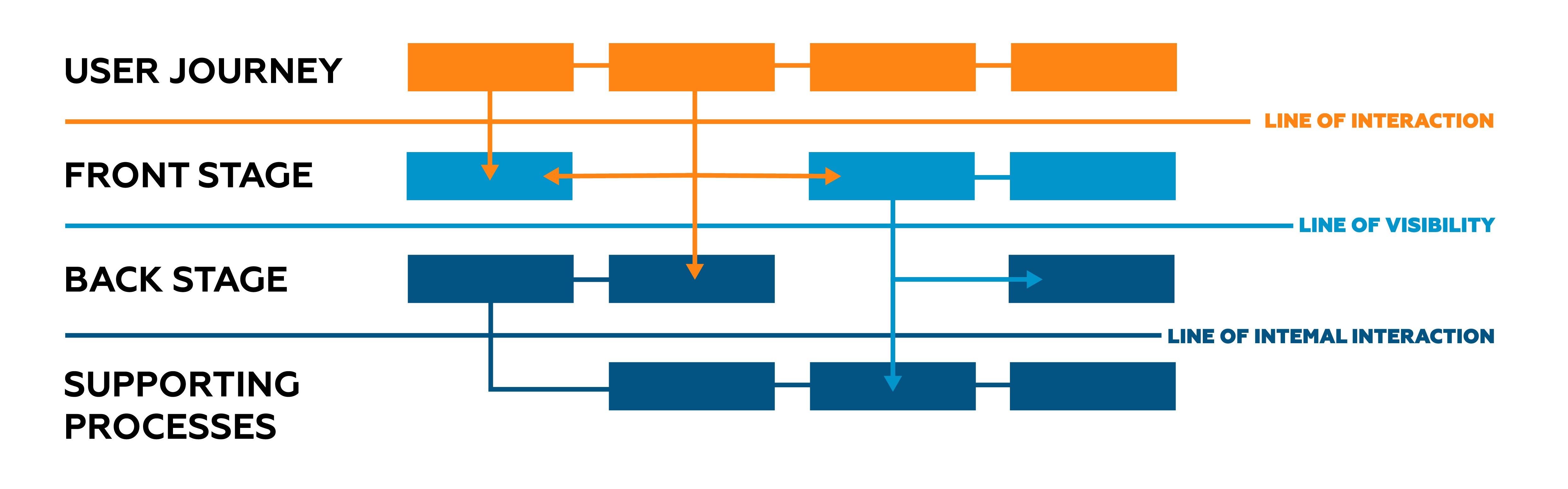
Blueprints are also structured around two important lines:
-
The line of interaction marks where users directly engage with the organisation.
-
The line of visibility separates visible activity from internal activity that the user never sees.
Many service blueprints also include evidence — the physical and digital artefacts users and employees encounter along the journey, such as forms, emails, dashboards, letters, and uploaded documents.
For enterprise teams, service blueprinting is especially valuable because it reveals what normal documentation often misses.
First, it exposes dependencies. One apparently simple touchpoint may rely on multiple internal steps and system integrations.
Second, it reveals redundancy. Information collected once is often requested again because different departments or systems do not share context.
Third, it helps identify the real cause of experience failure. If users are frustrated at a particular moment, the blueprint shows whether the issue comes from frontstage design, backstage process breakdown, or support-system limitations.
How Card Sorting Improves Information Architecture in Enterprise Portals
Once the journey is understood and the service model is clear, another question remains: how should information be organised so users can actually find what they need?
That is where card sorting helps.
Card sorting is a research method in which participants group labelled cards — representing pages, features, tools, or content items — into categories that make sense to them, then name those groups. This helps teams understand how users naturally organise information in their minds.
That matters because enterprise content is often structured around internal logic: departments, legacy systems, compliance categories, or technical classifications. Users do not think that way. They arrive with a task, a question, or a goal. When navigation reflects internal structure instead of user logic, people struggle to find what they need.
There are three main forms of card sorting:
Open card sorting asks participants to create their own groups and labels. This is useful in early-stage design when teams want to understand natural mental models without imposing structure.
Closed card sorting gives participants predefined categories and asks them to place content within them. This is useful for testing a proposed or existing information architecture.
Hybrid card sorting combines both, allowing teams to validate some assumptions while still leaving room for new categories to emerge.
The output helps identify consistent groupings, unclear labels, difficult content items, and contested structures. That insight informs how menus, navigation, category labels, and content hierarchies should be designed.
In enterprise contexts — such as SAP Fiori launchpads, large intranets, employee portals, or citizen-service platforms — card sorting can significantly improve findability, usability, and adoption.
How Journey Mapping, Service Blueprinting, and Card Sorting Work Together
These are not isolated methods. They work best as a connected system for understanding experience at different levels.
The journey map provides the macro view. It shows what the user is trying to achieve, what they experience across the journey, and where the biggest opportunities lie.
The service blueprint extends that view downward. It shows the organisational work, systems, and dependencies required to support the experience.
Card sorting addresses the information layer. It helps teams structure content and navigation in a way that supports how users actually search, interpret, and act.
Together, these methods give enterprise teams a fuller picture: the experience as users live it, the operating model that supports it, and the information architecture that either helps or obstructs them.
Enterprise UX Example: Redesigning a Financial Services Adviser Portal
Scenario: A financial services organisation is redesigning its adviser portal — a platform used by relationship managers to access client data, compliance documents, and product information.
The team starts with journey mapping. Based on interviews across three regions, they map a common scenario: preparing for a client review meeting. The map shows that advisers spend too much time preparing — not because the information is unavailable, but because it is spread across multiple systems. Frustration peaks when users have to open a third application just to complete basic preparation.
The service blueprint explains why. It shows that the fragmented experience is caused by separate backstage processes: CRM owns client data, a document management system holds compliance files, and product information is maintained elsewhere. No single team had previously seen how these dependencies combined to create user friction.
Card sorting is then used to redesign the portal structure. Advisers sort content and tools based on how they naturally work. The research shows they organise tasks around clients and meeting context — not around internal categories such as CRM, Compliance, and Products.
The result is a portal designed around users’ mental models, supported by a clearer service structure and fewer backstage barriers.
Best Practices for Journey Mapping, Service Blueprinting, and Card Sorting
When these methods create real business value, they tend to follow a few consistent principles.
Ground every map in research, not opinion. Journey maps based only on stakeholder assumptions may sound plausible, but they are not evidence. Interviews, observation, and behavioural data create far more useful artefacts.
Keep the actor singular. One map should represent one user type. Trying to combine multiple personas usually creates a compromised view that helps no one.
Use service blueprints to find causes, not just symptoms. If a journey map reveals frustration, the blueprint should help identify whether the issue comes from design, process, or systems.
Treat card sorting as input to architecture, not the final answer. The patterns are valuable, but they should be combined with navigation design, search behaviour, and content strategy.
Keep the artefacts alive throughout delivery. Journey maps and blueprints should not disappear after discovery workshops. They should influence sprint planning, prioritisation, user flows, and design decisions throughout the project lifecycle.
FAQ: Journey Mapping, Service Blueprinting, and Card Sorting in Enterprise Design
1. When should journey mapping happen in a project?
As early as possible, ideally before requirements are locked. Journey mapping is most valuable when it can still shape scope, priorities, and design direction.
2. How is a service blueprint different from a process map?
A process map shows how an internal process works. A service blueprint connects internal processes to the user journey, making it clear how operational activity affects experience.
3. How many participants are needed for a card-sorting study?
For qualitative card sorting, around 15 participants from the relevant user group is often enough to reveal useful patterns. For more statistically robust studies, 30 to 50 participants is a common benchmark.
4. Are these methods only useful for customer-facing products?
No. In many cases, they are even more valuable for internal enterprise tools. Employee platforms often contain some of the highest-friction experiences in the organisation.
5. How do journey maps influence actual design decisions?
They should directly inform user flows, priorities, and design principles. Friction points, information gaps, and emotional low points should translate into specific design and service problems to solve.
6. What is the most common mistake in service blueprinting?
Mapping the intended service instead of the real one. A useful blueprint reflects actual frontline behaviour, exceptions, and operational workarounds — not just documented policy.
At Tarento, we begin complex enterprise platform work by making the current reality visible: the journeys users navigate, the organisational activity that supports those journeys, and the information structures users depend on. Once that picture is shared, teams can make better decisions about what to build, what to simplify, and what to change.


Why Enterprises Must Exit Legacy Middleware In 2026