
How to Optimize Costs in Databricks: A Practical 2026 Guide

Databricks costs run high for three recurring reasons: workloads running on the wrong compute type, clusters left idle without auto-termination, and no tagging structure to attribute spend to a team or project. Fixing those three issues, moving production jobs off all-purpose compute, enforcing auto-termination through cluster policies, and tagging every resource for chargeback, is where most of the achievable savings sit, and FinOps practitioners commonly report 30 to 60 percent reductions from applying them systematically.
On Azure specifically, there's a hard deadline attached to one of these decisions: the Standard tier retires on October 1, 2026, and any workspace still on it by that date gets automatically upgraded to Premium, which carries a higher DBU rate on every workload running there.
Why Databricks Costs Rise Without Strong FinOps Controls
Databricks delivers serious analytics and AI capability, but cost drifts upward fast when nobody owns it. Forgotten clusters, oversized nodes, and the wrong compute type for the job quietly inflate the bill in ways that don't show up until a monthly invoice forces the question. FinOps teams and Databricks cost-optimization vendors consistently describe this as a 2 to 3x overspend pattern relative to what a workload actually needs, though that figure comes from repeated industry observation rather than one controlled study, worth noting for anyone citing it upward to a CFO. What is well documented, directly from Databricks' own architecture, is that a structured approach, applied consistently, brings spend down 30 to 60 percent without touching performance.
This guide works from the highest-impact decisions down to fine-tuning. The principles apply across AWS, Azure, and GCP, whether the workload is data engineering, SQL analytics, or ML.
The 2026 Deadline: What the Azure Standard Tier Retirement Actually Changes
Microsoft is retiring the Azure Databricks Standard tier on October 1, 2026, with new Standard tier workspace creation already blocked since April 1, 2026. The mechanism matters more than the date: Microsoft is not deleting Standard tier workspaces. It is automatically upgrading every remaining one to Premium, which carries higher DBU rates across every compute type running in that workspace. Nothing breaks on that date. The bill simply goes up on autopilot for anyone who hasn't planned around it.
The action item is concrete: audit which workspaces are still on Standard tier now, calculate the actual DBU rate difference for the workload mix running there, and decide whether to migrate proactively on a controlled timeline or let the automatic upgrade happen and absorb the cost increase. Teams that migrate on their own schedule generally have more room to also apply the compute and cluster optimizations below during the same migration window, rather than doing both under deadline pressure in October.
Understanding Databricks Pricing, DBUs, and Cloud Infrastructure Costs
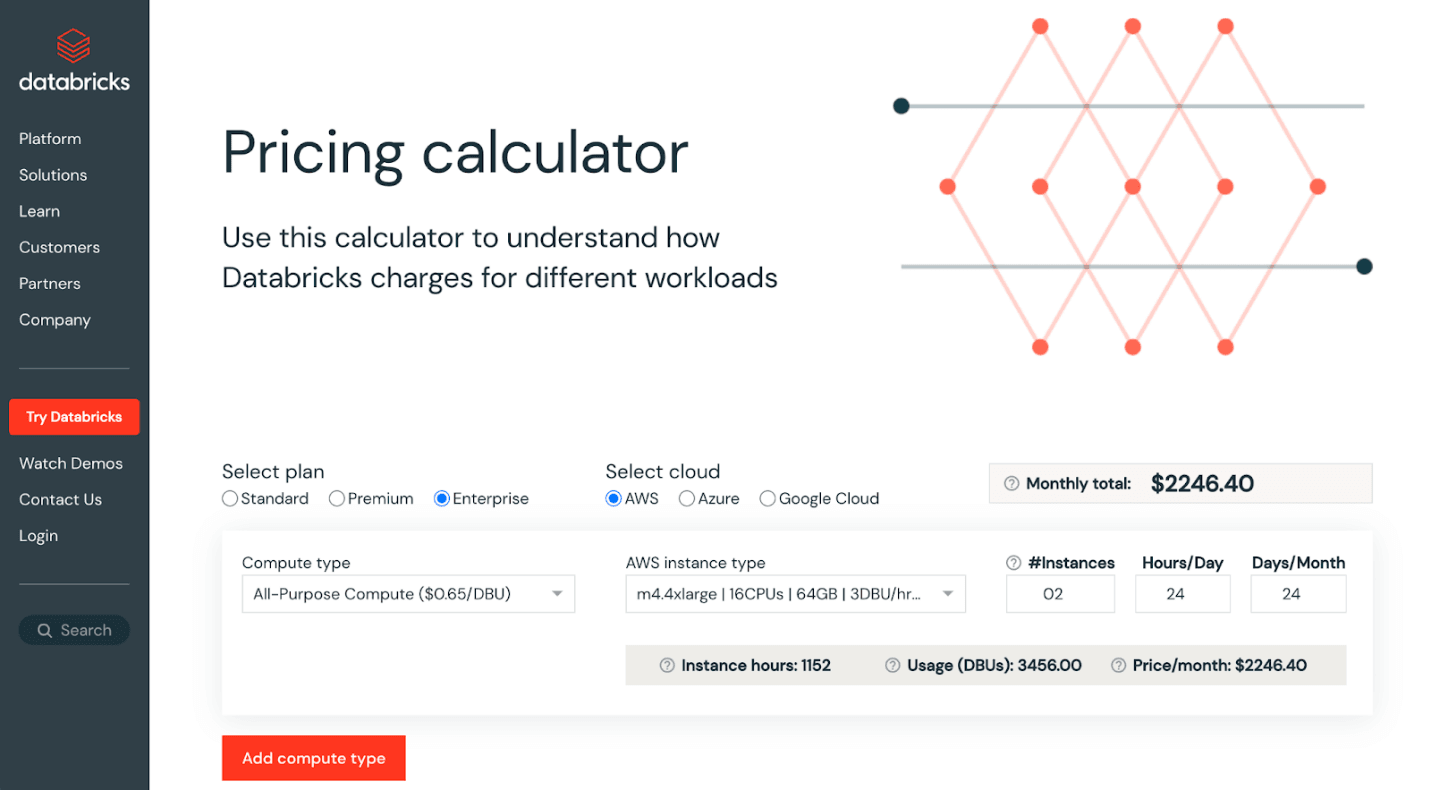
Every Databricks bill has two layers: platform usage measured in Databricks Units (DBUs), and the underlying cloud infrastructure the compute actually runs on. DBU rates vary by workload type, cloud, region, and pricing tier, but the pattern holds consistently across all three major clouds.
| Compute type | Typical DBU rate (Premium tier) | Best fit |
|---|---|---|
| All-Purpose Compute | Approximately $0.55/DBU | Interactive notebook work, exploratory analysis |
| Jobs Compute | Roughly $0.30/DBU on Azure, and reported 3 to 4x cheaper than All-Purpose on AWS for equivalent resources | Scheduled ETL, automated batch pipelines, production jobs |
| SQL Compute (classic) | Approximately $0.22/DBU | Provisioned BI and SQL warehouse workloads |
| Serverless SQL | Approximately $0.70/DBU, includes the underlying VM cost | Bursty, unpredictable query volume where auto-suspend beats a provisioned warehouse sitting idle |
The gap between All-Purpose and Jobs Compute for the same underlying work is the single highest-leverage number in this table, and it drives the first optimization below.
1. Switch Production Workloads to Job Compute
The fastest way to reduce Databricks costs is to stop running scheduled ETL, ML training, and batch jobs on all-purpose clusters meant for interactive notebook work. Job compute is built for automated, non-interactive workloads and runs at a meaningfully lower DBU rate for the identical underlying compute, as the table above shows. For most enterprises, migrating production pipelines off all-purpose compute delivers an immediate, measurable cut in DBU spend with no code changes required.
2. Enforce Auto-Termination on Every Cluster
Idle compute is one of the most common sources of Databricks waste, and it's also the easiest to eliminate. A cluster left running overnight costs the same whether it is processing queries or sitting completely empty. Set auto-termination on every interactive cluster, 10 to 15 minutes for development environments, and as low as 1 minute for serverless SQL warehouses in dev. For a team running five interactive clusters at $3/hour each, eliminating overnight idle time alone can save $2,000 to $4,000 per month.
Do not rely on individuals to remember. Enforce auto-termination through cluster policies so the setting is removed from personal discretion entirely.
3. Right-Size Clusters and Enable Autoscaling
Many clusters are over-provisioned because they were sized for peak load rather than average load. Open the cluster metrics view in Databricks: if average CPU sits below 40 percent and memory utilization stays under 50 percent, the cluster is too big for its workload.
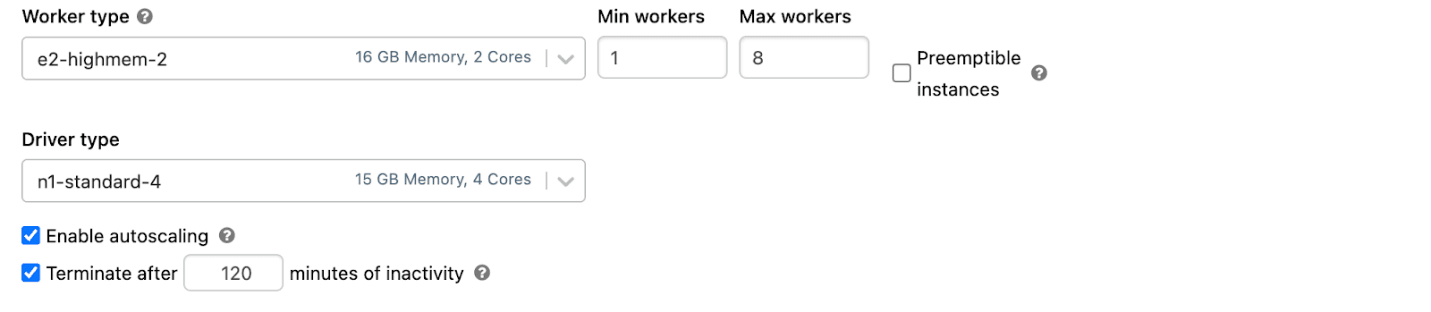
Start smaller than seems necessary, run the workload, monitor utilization, and add capacity only when sustained CPU exceeds 70 percent. Layer Databricks autoscaling on top with sensible minimum and maximum worker counts so capacity flexes with demand rather than sitting idle between jobs. For batch pipelines, drive that scaling automatically through the Databricks Job Scheduler.
4. Use Cluster Policies to Govern Configurations
Cluster policies let admins enforce cost-aware defaults across the organization rather than trusting every team to configure clusters correctly on their own. A well-designed policy caps maximum worker count to prevent oversized clusters, restricts users to cost-efficient instance types, requires auto-termination with a maximum idle threshold, and enforces a tagging scheme for chargeback and reporting.
Policies turn cost discipline into the default path rather than a behavior someone has to remember under deadline pressure. Educate teams on the pre-defined configurations available so compliant choices are also the convenient ones.
5. Use Spot Instances Strategically
Spot Instances on AWS and Spot VMs on Azure sell unused cloud capacity at a steep discount, often 60 to 90 percent off on-demand pricing. They can be reclaimed by the cloud provider with short notice, which makes them best suited for fault-tolerant workloads: ETL with retries, ML training that checkpoints, and stateless batch jobs.
The recommended pattern is on-demand driver, spot workers with on-demand fallback. This keeps the Spark driver stable while harvesting savings on the worker fleet, with graceful failover if spot capacity disappears mid-job.
6. Enable the Photon Engine for SQL-Heavy Workloads
Photon is Databricks' vectorized query engine, written in C++. A query that takes 10 minutes on standard Spark might take 4 minutes on Photon, and industry cost breakdowns generally put Photon's per-DBU rate meaningfully higher than standard compute for the same job type, on the order of two to three times, but the runtime reduction is typically large enough to bring total DBU consumption down anyway. The math works in Photon's favor specifically because it cuts wall-clock time, not because it's cheaper per unit of compute.
For SQL warehouses, BI dashboards, and SQL-heavy notebooks, Photon is typically the highest-ROI optimization available. Enable it selectively, on workloads that are actually vectorized enough to benefit, rather than everywhere by default.
7. Optimize Delta Lake Storage and Data Layout
Storage is where most teams stop paying attention, and where meaningful savings sit unclaimed. Delta Lake gives several tools to keep storage and query costs down together. OPTIMIZE with ZORDER compacts small files and clusters data by frequently queried columns, reducing scan time and DBU consumption. VACUUM removes obsolete data files left over from prior transactions. Partitioning large tables on high-cardinality columns shrinks the data scanned per query and enables predicate pushdown. Disk cache keeps hot data on local SSDs, cutting repeat cloud-storage reads by 50 to 80 percent. Tiered storage moves cold data to lower-cost tiers such as S3 Glacier, Azure Archive, or GCS Coldline.
Use compressed columnar formats like Parquet for external data, and avoid the small-files problem that forces clusters to work harder than the data actually requires. One frequently overlooked lever: the default spark.sql.shuffle.partitions value of 200 is rarely correct for a given workload, too high for small datasets, too low for multi-terabyte jobs, and a common, quiet cause of spill-to-disk DBU bloat.
8. Tag Everything for Cost Attribution and FinOps
Spend cannot be optimized if it cannot be attributed to a team or project first. Tag every workspace, cluster, SQL warehouse, and pool by team, project, environment, and cost center. Databricks usage data carries those tags through to the billing system tables (system.billing.usage), which makes accurate chargeback or showback possible rather than an educated guess at quarter-end.
Without allocation, optimization becomes a quarterly fire drill triggered by a surprising invoice. With it, every team sees what its own workloads cost and can make trade-offs in real time, which is the actual foundation of a FinOps practice rather than a slide about one. Schedule a recurring housekeeping job to apply or clean up tags so the model holds up as the environment scales past what any one person can track manually.
9. Use the DBU Calculator and Monitor Continuously
The Databricks DBU calculator estimates cost for a given workload before it runs, useful when planning new pipelines or comparing cluster configurations against each other before committing engineering time to either. Pair it with ongoing monitoring: account-level cost dashboards, budgets, alerts, and serverless usage policies on serverless workloads, regular cost audits to flag clusters drifting off policy, and anomaly alerts on month-over-month DBU spikes.
For serverless compute specifically, where elasticity makes spending scale quickly with workload volume, set workspace-level spending limits, tag every job for chargeback, and schedule heavy batch workloads outside peak hours. Cost optimization is not a one-off project. It's an ongoing discipline that needs visibility, ownership, and a review cycle built into the engineering workflow, not bolted onto it after the fact.
Databricks Cost Optimization Quick-Win Checklist
- Move production pipelines from all-purpose to job compute
- Set 10 to 15 minute auto-termination on all interactive clusters
- Apply cluster policies enforcing size limits and mandatory tags
- Enable autoscaling on long-running clusters
- Add spot workers with on-demand fallback for batch jobs
- Turn on Photon for SQL-heavy workloads
- Schedule OPTIMIZE and VACUUM on hot Delta tables
- Roll out tagging and review monthly spend by team
- Audit any Azure workspaces still on Standard tier before October 1, 2026
Frequently Asked Questions
When does the Azure Databricks Standard tier retire?
October 1, 2026. New Standard tier workspace creation was already blocked as of April 1, 2026. Any Standard tier workspace still active on the retirement date is automatically upgraded to Premium, which carries higher DBU rates across its workloads.
What happens to my data if my Databricks Standard tier workspace is automatically upgraded?
The automatic upgrade is designed to preserve continuity, so data and workspace configuration are not deleted. The cost impact comes from the Premium tier's higher per-DBU rates applying going forward, not from any data loss during the transition.
What is the difference between All-Purpose Compute and Jobs Compute pricing?
All-Purpose Compute runs at approximately $0.55 per DBU on the Premium tier, while Jobs Compute runs meaningfully lower, roughly $0.30 per DBU on Azure and reported as 3 to 4 times cheaper than All-Purpose on AWS for equivalent resources. The difference exists because Jobs Compute is built for automated, non-interactive work with no persistent session overhead.
Does enabling Photon always reduce Databricks costs?
Not automatically. Photon carries a higher DBU rate than standard compute for the same job type, but it typically cuts query runtime enough that total DBU consumption still falls. It delivers the highest return on SQL-heavy and BI workloads specifically, and less benefit on workloads that aren't vectorized enough to take advantage of it.
How much can a company realistically save on Databricks costs?
FinOps practitioners commonly report 30 to 60 percent reductions from applying compute-type correction, auto-termination, cluster policies, and tagging systematically, often within the first 90 days. Broader claims of 2 to 3x overspend or specific idle-waste percentages are widely repeated across the industry but don't trace back to one controlled, citable study, so they're worth treating as directional rather than a guaranteed baseline for any specific environment.
How Tarento Helps Enterprises Optimize Databricks Costs
Tarento's Data and Analytics practice helps enterprises modernize, govern, and optimize Databricks environments end to end. That includes assessing current DBU consumption, designing cluster and policy frameworks aligned with FinOps practice, migrating workloads from all-purpose to job compute, and building the governance and tagging model that scales with a growing team, including managing the Standard-to-Premium migration on a controlled timeline rather than the automatic one. For organizations running Databricks across AWS, Azure, or GCP, this draws on enterprise data platform modernization experience across regulated and high-scale environments.
Learn more about Tarento's Data & Analytics and DataVolve practices.


Geospatial Data Management for Enterprise AI: 2026 Guide